Showing posts with label menu. Show all posts
Showing posts with label menu. Show all posts
Thursday, November 7, 2013
cara pasang menu accordion
Kebaikan Pemasangan menu accordion ini adalah ia menjimatkan ruangan pada sidebar.menu ini akan menyembunyikan widget dan akan terbuka bila dihalakan mouse cursor padanya:
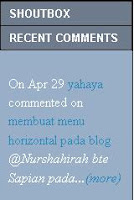
Cara memasangnya:
1.Log in ke blogger
Kod warna yang berwarna oren boleh diubah mengikut kesesuaian:
color: #ffffff;--warna font untuk tajuk
background-color #6D7B8D---warna latar belakang tajuk
background-color #98AFC7—warna latar belakang kotak accordion
kod kod widget bagi shoutbox,recents comment dan sebagainya boleh dimasukkan pada teks masukkan kod disini.
Dan tajuk1, tajuk 2 dan tajuk 3 diatas diubah mengikut tajuk widget berkenaan
update 9/5/2013
Read More..
Cara memasangnya:
1.Log in ke blogger
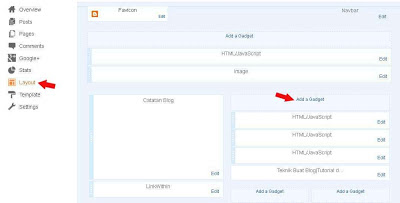
2.Pada dashboard pilih Layout---Add a gadget
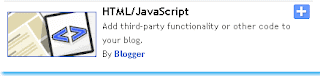
3.HTML/Javascript
 dan masukkan kod dibawah ini
<style type="text/css">
h5 {
font-family: arial, trebuchet-ms, tahoma;
font-size: 13px;
font-weight:bold;
padding: 0 0 1em;
color: #ffffff;
}
.msg_list {
list-style: none;
padding: 0;
margin: 0;
width: 100%;
}
.msg_head {
padding: 5px 10px;
cursor: pointer;
position: relative;
margin:1px;
background-color: #6D7B8D;
}
.msg_body {
padding: 5px 10px 15px;
background-color: #98AFC7;
}
</style>
<script type="text/javascript" src=" https://sites.google.com/site/teknikbuatblog/tbb/menuaccordion.js?attredirects=0&d=1 "></script>
<script type="text/javascript">
$(document).ready(function()
{
//hide the all of the element with class msg_body
$(".msg_body").hide();
//slides the element with class "msg_body" when paragraph with class "msg_head" is clicked
$("#firstpane h5.msg_head").click(function()
{
$(this).next("div.msg_body").slideToggle(700).siblings("div.msg_body").slideUp("slow");
});
//slides the element with class "msg_body" when mouse is over the paragraph
$("#secondpane h5.msg_head").mouseover(function()
{
$(this).next("div.msg_body").slideDown("slow").siblings("div.msg_body").slideUp("slow");
});
});
</script>
<div class="msg_list" id="secondpane">
<h5 class="msg_head">Tajuk 1</h5>
<div class="msg_body">
</div>
<h5 class="msg_head">Tajuk 2</h5>
<div class="msg_body">
<h5 class="msg_head">Tajuk 3</h5>
<div class="msg_body">
</div>
</div>
3.HTML/Javascript
<style type="text/css">
h5 {
font-family: arial, trebuchet-ms, tahoma;
font-size: 13px;
font-weight:bold;
padding: 0 0 1em;
color: #ffffff;
}
.msg_list {
list-style: none;
padding: 0;
margin: 0;
width: 100%;
}
.msg_head {
padding: 5px 10px;
cursor: pointer;
position: relative;
margin:1px;
background-color: #6D7B8D;
}
.msg_body {
padding: 5px 10px 15px;
background-color: #98AFC7;
}
</style>
<script type="text/javascript" src=" https://sites.google.com/site/teknikbuatblog/tbb/menuaccordion.js?attredirects=0&d=1 "></script>
<script type="text/javascript">
$(document).ready(function()
{
//hide the all of the element with class msg_body
$(".msg_body").hide();
//slides the element with class "msg_body" when paragraph with class "msg_head" is clicked
$("#firstpane h5.msg_head").click(function()
{
$(this).next("div.msg_body").slideToggle(700).siblings("div.msg_body").slideUp("slow");
});
//slides the element with class "msg_body" when mouse is over the paragraph
$("#secondpane h5.msg_head").mouseover(function()
{
$(this).next("div.msg_body").slideDown("slow").siblings("div.msg_body").slideUp("slow");
});
});
</script>
<div class="msg_list" id="secondpane">
<h5 class="msg_head">Tajuk 1</h5>
<div class="msg_body">
Masukkan kod disini.
</div>
<h5 class="msg_head">Tajuk 2</h5>
<div class="msg_body">
Masukkan kod disini.
<h5 class="msg_head">Tajuk 3</h5>
<div class="msg_body">
Masukkan kod disini.
</div>
</div>
Kod warna yang berwarna oren boleh diubah mengikut kesesuaian:
color: #ffffff;--warna font untuk tajuk
background-color #6D7B8D---warna latar belakang tajuk
background-color #98AFC7—warna latar belakang kotak accordion
kod kod widget bagi shoutbox,recents comment dan sebagainya boleh dimasukkan pada teks masukkan kod disini.
Dan tajuk1, tajuk 2 dan tajuk 3 diatas diubah mengikut tajuk widget berkenaan
update 9/5/2013

Subscribe to:
Posts (Atom)